My 2p about ERP Solutions, Information Worker Solutions and other software products (mainly Microsoft Dynamics AX and Microsoft SharePoint).
Showing posts with label Reports. Show all posts

06 September 2012

Change dynamically the sorting or grouping in a Report

Business requirement

My user wanted to be able to run a report for which the data could be dynamically grouped and sorted depending on some choice the user made upon starting up the report. According to the choice made, some other Sections should appear in between the grouped report data blocks.

Solution

Create a new BaseEnum, let’s call it ProjCust, with the different sorting and/or grouping possibilities, for example one to group by ProjId and one to group by CustAccount.

Create the report Class.

Define in the classDeclaration a DialogField and variable to handle the different sorting/grouping possibilities for the report.

public class TutorialGroupReport_GroupReport 
extends RunBaseReport
{
    DialogField             dialogReportBy;

    ADUProjCustDlvDate      reportBy;    
#localmacro.CurrentList

        reportBy

    #endmacro
}

In the dialog method, the possibilities to sort/group the report data is shown.


public Object dialog()

{

    DialogRunbase dialog = super();

    ;

    dialog.addGroup("@SYS1046");


    dialogReportBy  =
dialog.addFieldValue(TypeId(ProjCust),
reportBy,
"@SYS55014");


    return dialog;

}


In the getFromDialog method, store the sorting/grouping option chosen by the end user


public boolean getFromDialog()  
{

    ;

    reportBy    = dialogReportBy.value();

     return super ();
}

Create a method to return the option chosen by the end user.


ProjCust reportBy()  
{
    return reportBy;
}


Create an updateQuery method, which will adapt dynamically the report Query based on the option chosen by the end user


public Query updateQuery()  
{

    Query                   query;
    QueryBuildDataSource    queryBuildDataSource;

    QueryBuildRange         queryBuildRange;
    ;

    query = queryRun.query();

    queryBuildDataSource =
query.dataSourceTable(tableNum(ProjTable));

     switch (this.reportBy())
    {

        case ProjCust::ProjId:
            queryBuildDataSource.addSortField(
fieldNum(ProjTable,ProjId));

            break;
        case ProjCust::CustAccount:

            queryBuildDataSource.addSortField(
fieldNum(ProjTable,CustAccount));
            queryBuildDataSource.addSortField(
fieldNum(ProjTable,ProjId));

            break;
        default:    // In default, error.

            throw error(strFmt("@SYS27147",
this.toString()));
    }

    return query;
}

Call the updateQuery method in the run method.


void run()  
{

    ;

    this.updateQuery();

     super();
}

Add the other appropriate methods to the class, such as a lastValueElementName, pack, unpack, description and main method.


Create the Report and the Design of it.


Add your report Class and the report DataSource to be grouped/sorted dynamically as variable the classDeclaration

public class ReportRun extends ObjectRun  
{

    TutorialGroupReport_GroupReport tutorial_GroupReport;
    ProjTable                       projTable;

}

Assign the caller to the report Class variable in the init method.

public void init()   
{

    super();

     tutorial_GroupReport = element.args().caller();

}


In the fetch method you can change the sorting/grouping dynamically based on the choice of the end user and if necessary add additional design stuff.

public boolean fetch() 

{
    QueryRun        queryRunProjTable;

    ProjId          parentProjId;
    CustAccount     custAccount;

    ;

    queryRunProjTable = new QueryRun(
tutorial_GroupReport.updateQuery());

    this.queryRun(queryRunProjTable);

    while (queryRunProjTable.next())

    {
        projTable = queryRunProjTable.get(
tableNum(ProjTable));


        switch (tutorial_GroupReport.reportBy())
        {

            case ProjCust::ProjId:
                if (projTable.ParentId != parentProjId)

                    this.execute(1);
                    parentProjId = projTable.ParentId;

                break;
            case ProjCust::CustAccount:

                if (projTable.CustAccount != custAccount)
                    this.execute(2);

                    custAccount = projTable.CustAccount;
                break;

            default:    // In default, error.
                throw error(strFmt("@SYS27147",
this.toString()));
        }


        this.send(projTable);
    }

    return true;
}


Continue reading......

by Patrik Luca 0 comments

24 October 2011

Printing documents linked with Document Handling while printing Reports

Business requirement: Printing documents linked with Document Handling while printing Reports

This post describes how you can print automatically documents linked with Document Handling while printing a Report. This post elaborates following business scenario: users attach documents to the Project entity. Upon printing the Project Invoice, these documents should be printed right away and in an automatic way.

Solution:

Add a new ProjTable variable to the classDeclaration of the Report ProjInvoice: it will be used to store the value of our currently printed Project.

Create a method on table ProjInvoiceJour to get the ProjId for the currently printed Project Invoice. In this scenario we suppose no Project Invoices are made over multiple Projects, so there is a one to one link between a Project Invoice and a Project (which is not an obligation in Dynamics AX).


display ProjId projId()
{
ProjInvoiceItem projInvoiceItem;
ProjInvoiceEmpl projInvoiceEmpl;
ProjInvoiceCost projInvoiceCost;
ProjInvoiceRevenue projInvoiceRevenue;
ProjInvoiceOnAcc projInvoiceOnAcc;
ProjId projId = '';
;

while select projInvoiceEmpl
where projInvoiceEmpl.ProjInvoiceId ==
this.ProjInvoiceId
&& projInvoiceEmpl.InvoiceDate == this.InvoiceDate
{
if (projId && projId != projInvoiceEmpl.ProjId)
return "";
projId = projInvoiceEmpl.ProjId;
}

while select projInvoiceItem
where projInvoiceItem.ProjInvoiceId ==
this.ProjInvoiceId
&& projInvoiceItem.InvoiceDate == this.InvoiceDate
{
if (projId && projId != projInvoiceItem.ProjId)
return "";
projId = projInvoiceItem.ProjId;
}

while select projInvoiceCost
where projInvoiceCost.ProjInvoiceId ==
this.ProjInvoiceId
&& projInvoiceCost.InvoiceDate == this.InvoiceDate
{
if (projId && projId != projInvoiceCost.ProjId)
return "";
projId = projInvoiceCost.ProjId;
}

while select projInvoiceRevenue
where projInvoiceRevenue.ProjInvoiceId ==
this.ProjInvoiceId
&& projInvoiceRevenue.InvoiceDate == this.InvoiceDate
{
if (projId && projId != projInvoiceRevenue.ProjId)
return "";
projId = projInvoiceRevenue.ProjId;
}

while select projInvoiceOnAcc
where projInvoiceOnAcc.ProjInvoiceId ==
this.ProjInvoiceId
&& projInvoiceOnAcc.InvoiceDate == this.InvoiceDate
{
if (projId && projId != projInvoiceOnAcc.ProjId)
return "";
projId = projInvoiceOnAcc.ProjId;
}

return projId;
}


Call this method in the fetch of the Report ProjInvoice.


...
projInvoiceTable = ProjInvoiceTable::find(
projInvoiceJour.ProjInvoiceProjId);
// BGN Get ProjId for the ProjInvoiceJour
projTable = ProjTable::find(projInvoiceJour.projId());

projFormLetterReport.loadPrintSettings(
// END
...


Create a method printLinkedDocuments in the Report ProjInvoice.


void printLinkedDocuments()
{
#WinAPI
DocuRef docuRef;
;
while select docuRef
where docuRef.RefCompanyId == projTable.dataAreaId
&& docuRef.RefTableId == tableNum(ProjTable)
&& docuRef.RefRecId == projTable.RecId
{
if(docuRef.RecId)
{
if (element.printJobSettings().getTarget() ==
PrintMedium::Printer)
{
WinAPI::shellExecute(docuRef.completeFileName(),
element.printJobSettings().printerPrinterName(),
‘’,
#ShellExePrint);
}
}
}
}


Call this method in the fetch method of the ProjInvoice Report.


...
this.printDocumentHeader();
this.send(formLetterRemarks);
// BGN Print documents linked with document handling
this.printLinkedDocuments();
// END

if (element.page() != 1)
{
...


When printing the ProjInvoice Report to a Printer, the linked documents will be printed too: the linked documents will be printed on the default Windows printer of the user.


Continue reading......

by Patrik Luca 2 comments

21 October 2011

Print ranges on Generated Design of a Report

Business Requirement: printing ranges on a report

Printing the ranges with which a Report has been executed is only available for a AutoDesignSpecs Design of a Report.

Unfortunately this option is not available for Reports having a Generated Design.

Solution: override executeSection method in PageHeader

You can print the ranges with some X++ code modifications in your report.

  1. Add a PageHeader control to the Report, if there isn’t yet such a control in your Report.
  2. Override the executeSection method of the PageHeader control as follows:

    public void executeSection()
    {
    // BGN Printing ranges
    SysReportRun locSysReportRun;
    ;
    //END

    super();

    // BGN Printing ranges
    locSysReportRun = element;
    locSysReportRun.printRanges(true);
    SysReportRun::executePrintRangeSection(element);
    // END
    }


Continue reading......

by Patrik Luca 0 comments

04 May 2010

Turning DataField Property off in a Section Group on a Report

Business Requirement

With the DataField Property of a section group control on a report, you can create sections using the same table. In this post I explain how you can turn this off if the DataField Property has a value in your Report Design.

This post uses an existing Report as example: Report CustGrossMarginByAccount. It can be found in Accounts Receivable > Reports > Statistics > Customer > Gross Margin by Customer.

Solution

Step 1 Add new global variables in the ClassDeclaration

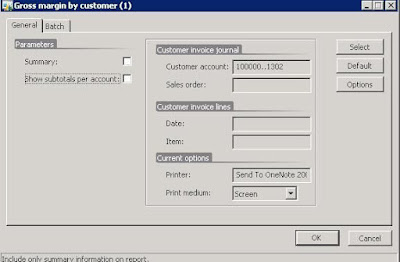
Add new global variables dialogShowSubTotals and showSubTotals in the ClassDeclaration of Report CustGrossMarginByAccount: a new checkbox should become available on the startup dialog of the Report in which the end user can choose to print subtotals or not.

public class ReportRun extends ObjectRun

{

    Amount custGross;

    Amount custMargin;

    Amount custCost;

    Amount totGross;

    Amount totMargin;


    ReportSectionGroup      rsSG;

    ReportSection           rsBody;

    ReportSection           rsDetailHeader;

    ReportSection           rsSummaryHeader;

    CustName custName;


    DialogField         dialogSummary;

    NoYes               summary;

    DialogField         dialogShowSubTotals;

    NoYes               showSubTotals;


    #define.CurrentVersion(2)

    #localmacro.CurrentList

        summary,

        showSubTotals

    #endmacro

}


Step 2 Add a field to the dialog to have the option to print subtotals


Add a field to the dialog by modifying the dialog method: the user will be able to choose here if subtotals should be printed or not.


public Object dialog(Object _dialog)

{

    DialogRunbase dialog = super(_dialog);

    ;


    dialog.addGroup("@SYS7764");    // Parameters


    dialogSummary = dialog.addFieldValue(typeid(NoYes),
summary,
"@SYS62602",
"@SYS99221");


dialogShowSubTotals = dialog.addFieldValue(typeid(NoYes),
showSubTotals,
"@SYS26674");


    return dialog;
}


Step 3 Store the value by modifying the getFromDialog method


Modify the getFromDialog method to store the value of the chosen print option.


public NoYes getFromDialog()

{

    ;

    summary = dialogSummary.value();
    showSubTotals = dialogShowSubTotals.value();

    return true;

}


Step 4 Modify the fetch method to turn subtotals on or off


Modify the fetch method to switch the subtotals on or off.


public boolean fetch()

{
Queryrun qr;

    ReportSectionGroup  reportSectionGroup;

    ;

    if (!showSubTotals)

    {

        reportSectionGroup = element.design().sectionGroup( tableNum(CustInvoiceJour)

            ,fieldName2Id(tableNum(CustInvoiceJour)

            ,"OrderAccount"));

        reportSectionGroup.dataField(0);

    } …..

}


Result


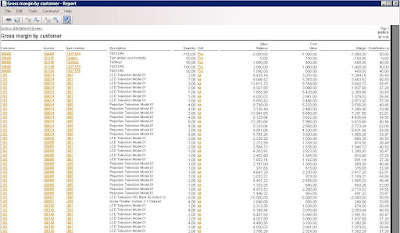
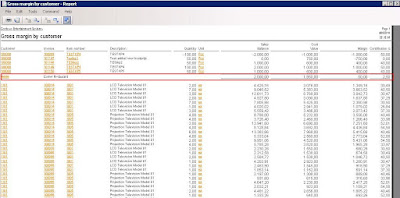
Upon starting the Report CustGrossMarginByAccount the end user has the option to print the subtotals per Order Account or not.


Leaving the option unchecked, results in a report without subtotals per Order Account:


Checking the subtotals option results in a report with the subtotals:


Continue reading......

by Patrik Luca 0 comments

Patrik Luca, Ieper, BELGIUM
Feel free to use or spread all of the content on my blog. In return, linking back to my blog would be greatly appreciated. All my posts and articles are provided "AS IS" with no warranties.

Subscribe feeds via e-mail
Subscribe in your preferred RSS reader

Subscribe feeds rss Most Read Entries

Categories

Recommended Books


Subscribe feeds rss Recent Comments

This Blog is part of the U Comment I Follow movement in blogosphere. Means the comment field of this blog is made DOFOLLOW. Spam wont be tolerated.

Blog Archive

My Blog List

Followers

Links